

If you run your business alone, you already know the problem. Every lead lives somewhere different. A name sits in your inbox, a follow-up you meant to send sits in your head, and the spreadsheet you promised to keep updated has not been touched since March. A CRM fixes that, but only if you actually use it. That is where most CRMs fail solo owners: they are built for sales teams, with admin work to match.
This guide looks at CRM software through one lens: what works when there is exactly one of you. We compared free plans, starting prices, and the features a one-person business genuinely needs, then cut everything that only makes sense for a team of twenty.
The 6 best CRM for solopreneurs at a glance
| CRM | Best for | Free plan | Paid plans start at |
|---|---|---|---|
| HubSpot CRM | Best free CRM | Yes, up to 2 users | $9 per seat/month, billed annually |
| Zoho CRM | Best free plan with automation | Yes, up to 3 users | $14 per user/month, billed annually |
| Pipedrive | Best for active selling | No, 14-day trial | $14 per seat/month, billed annually |
| Less Annoying CRM | Best for simplicity | No, 30-day trial | $15 per user/month, flat |
| Capsule CRM | Best simple paid CRM | Yes, up to 250 contacts | $18 per user/month, billed annually |
| Folk CRM | Best for relationship-led work | No, 14-day trial | $24 per user/month, billed annually |
- Every price and plan limit below was read on the vendor’s own pricing page in October 2026.
- Scores are our own judgement, based on the free plan, the price for one seat, and how much setup the tool demands.
- No vendor paid to be included, and none of them saw the scores in advance. Where a vendor would not show a US dollar price publicly (Zoho), we say so instead of guessing.
What matters most when you run the business alone
Forget the feature lists written for sales departments. When you are the whole company, four things matter:
- Fast contact capture. If adding a person takes more than a minute, you will quietly stop doing it, and the CRM dies within a month.
- One clear pipeline. A single board that answers one question every morning: who needs a follow-up today?
- Email inside the CRM. Sending and logging emails without copying and pasting between tabs saves real hours over a year.
- A price that makes sense for one seat. Per-user pricing designed for teams quietly taxes solo owners for seats that will never exist.
Every tool below was judged on those four points, plus one more: how much setup it demands before it starts helping. The best CRM for solopreneurs is the one that survives contact with a real workload.
A CRM with ten features you use beats a CRM with two hundred you avoid.
HubSpot CRM: best free CRM for solopreneurs
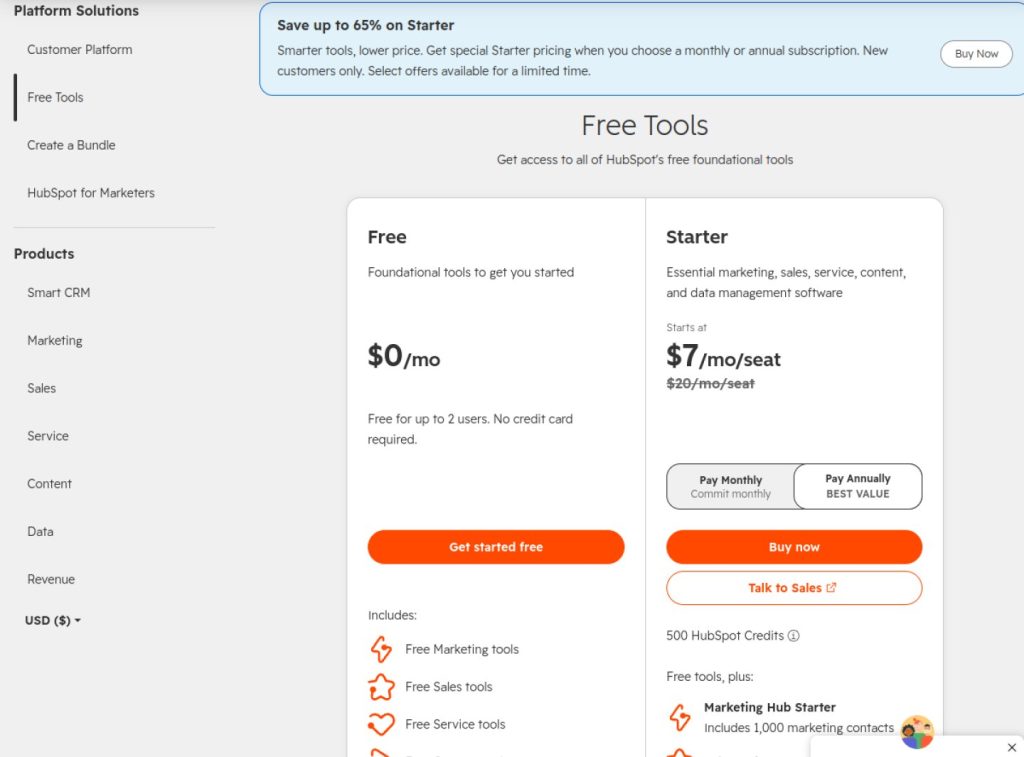
HubSpot is the name most people hear first, and for once the popular answer is also the sensible one. Its free CRM is not a stripped-down demo. You get contact and company records with no contact limit, one deal pipeline, a meeting scheduler that syncs with your calendar, Gmail and Outlook integration, and a proper mobile app. For a solo owner, that covers the daily reality of tracking who you talked to and what happens next.
The free plan does have edges. It covers up to 2 users, which is fine when there is one of you. HubSpot branding appears on free tools, email tracking is capped at 200 notifications a month, and there is no automation or follow-up sequences. When you outgrow it, Sales Hub Starter costs $9 per seat per month billed annually, or $15 on monthly billing, and it removes the branding, adds a second pipeline, and unlocks simple automation.
What we like
- Genuinely usable free plan with unlimited contacts
- Meeting scheduler and email integration included free
- Easy to learn, huge library of free help content
What could be better
- Only one pipeline on the free plan
- Paid prices climb quickly once you leave Starter
- No automation until you pay
Zoho CRM: best free plan with room to grow
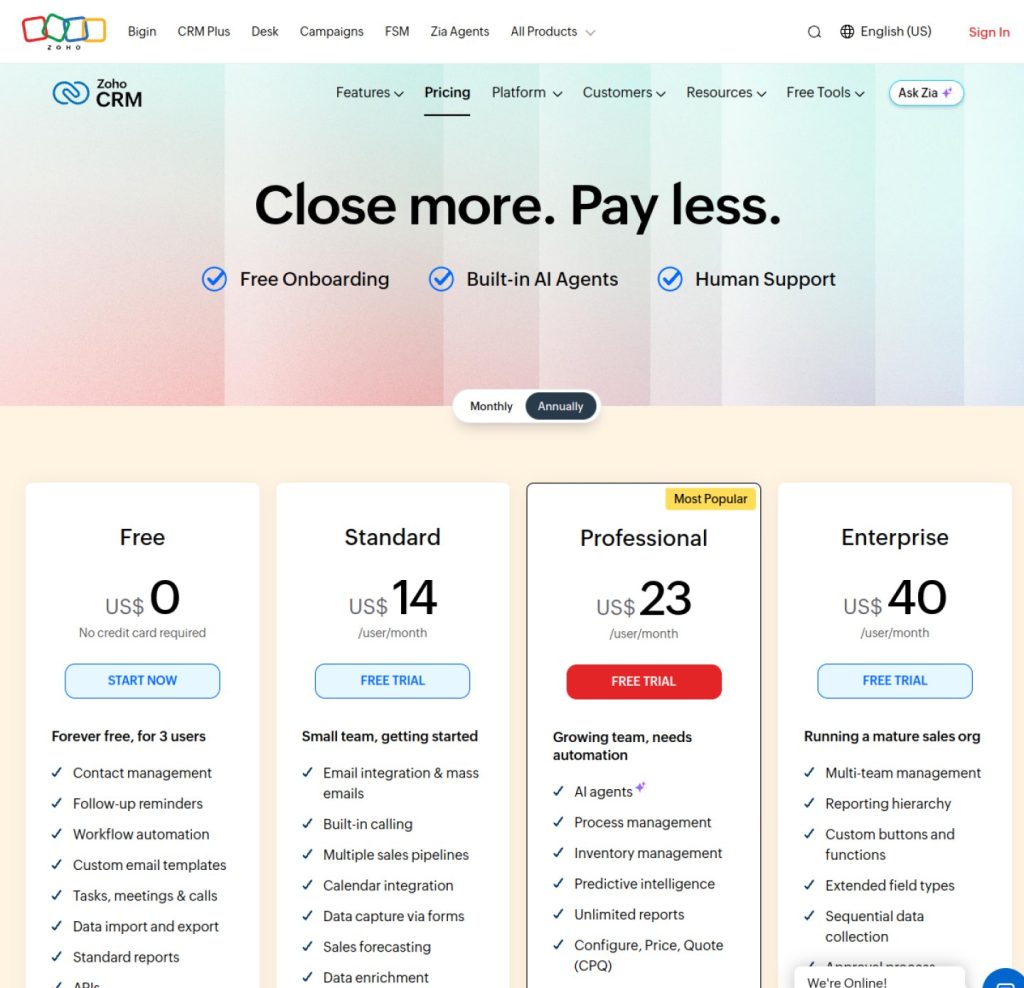
Zoho takes the opposite approach to HubSpot. Where HubSpot keeps its free plan tidy and limited, Zoho hands you a full-sized CRM and lets up to 3 users in for free, with leads, deals, workflow automation, reports, and the mobile app included. Getting automation on a free plan is rare, and it matters for a solo owner, because a workflow that reminds you, or emails a lead, is doing the job of an assistant you do not have.
The trade-off is effort. Zoho CRM is a broad, deep product, and it feels like one. Expect a busier interface and more setup time than the simpler tools in this list. Zoho knows this, which is why its own pricing page points spreadsheet users toward Bigin, its simpler sibling product. Paid plans begin with the Standard edition, which adds multiple pipelines and full email integration; check Zoho’s pricing page for current US pricing, since it varies by billing choice and region.
What we like
- Free for up to 3 users, with workflow automation included
- Deep feature set you can grow into for years
- Part of a large app ecosystem if you want accounting or helpdesk later
What could be better
- Steeper learning curve than the other tools here
- Interface can feel busy for a one-person business
- Multiple pipelines require a paid plan
Pipedrive: best if your day is selling
You can tell who made Pipedrive the moment you open it. People who sell for a living designed it, so the pipeline board comes first, not buried behind reports. Deals sit in clear stages, stale deals are easy to spot, and the whole product pushes you toward the next action instead of more data entry. If winning work is your main daily activity, this is the most focused tool on the list, backed by more than 500 integrations.
There is no free plan, only a 14-day trial. The entry plan, Lite, costs $14 per seat per month billed annually. Lite covers lead, calendar, and pipeline management, but it caps you at 2,500 open leads and deals per seat, and it leaves out automations and full email sync. Both arrive on the Growth plan, which means committed sellers should budget for one tier up from day one.
What we like
- The clearest, most motivating pipeline view in this list
- Built around activities and follow-ups, not record keeping
- Large integration library
What could be better
- No free plan at all
- Automations and full email sync need the Growth plan
- Less suited to client admin beyond the sale
Less Annoying CRM: best for simplicity
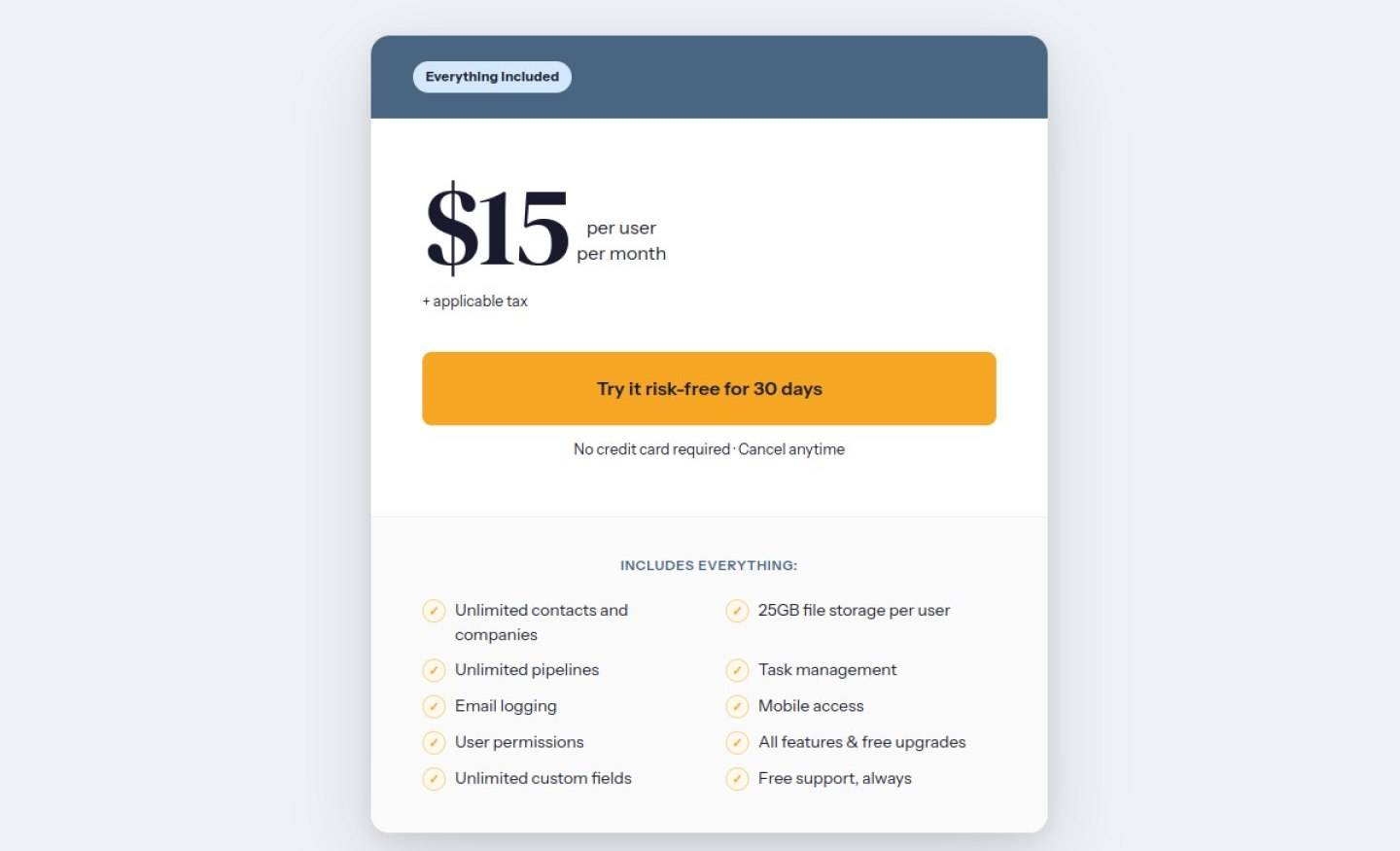
The name is the product strategy. Less Annoying CRM has exactly one plan: $15 per user per month, no tiers, no annual discount games, no features held hostage behind an upgrade button. Everything is included from the start: unlimited pipelines, unlimited custom fields, task management, email logging, and free phone and email support for every customer. The stated guidance is to stay under 50,000 contacts and companies, with 25 GB of file storage per user, limits a solo business will never realistically touch.
There is no free plan, but the 30-day trial needs no credit card. What you give up for this simplicity is depth: no automation engine, no marketing tools, nothing fancy. For many solo owners that is not a weakness. It is the entire point. A CRM with ten features you use beats a CRM with two hundred you avoid.
What we like
- One flat price with every feature included
- Nothing to configure, works the way a notebook brain expects
- Free human support on phone and email
What could be better
- No free plan, trial only
- No automations or advanced reporting
- Design is plain compared with newer rivals
Capsule CRM: best simple paid option
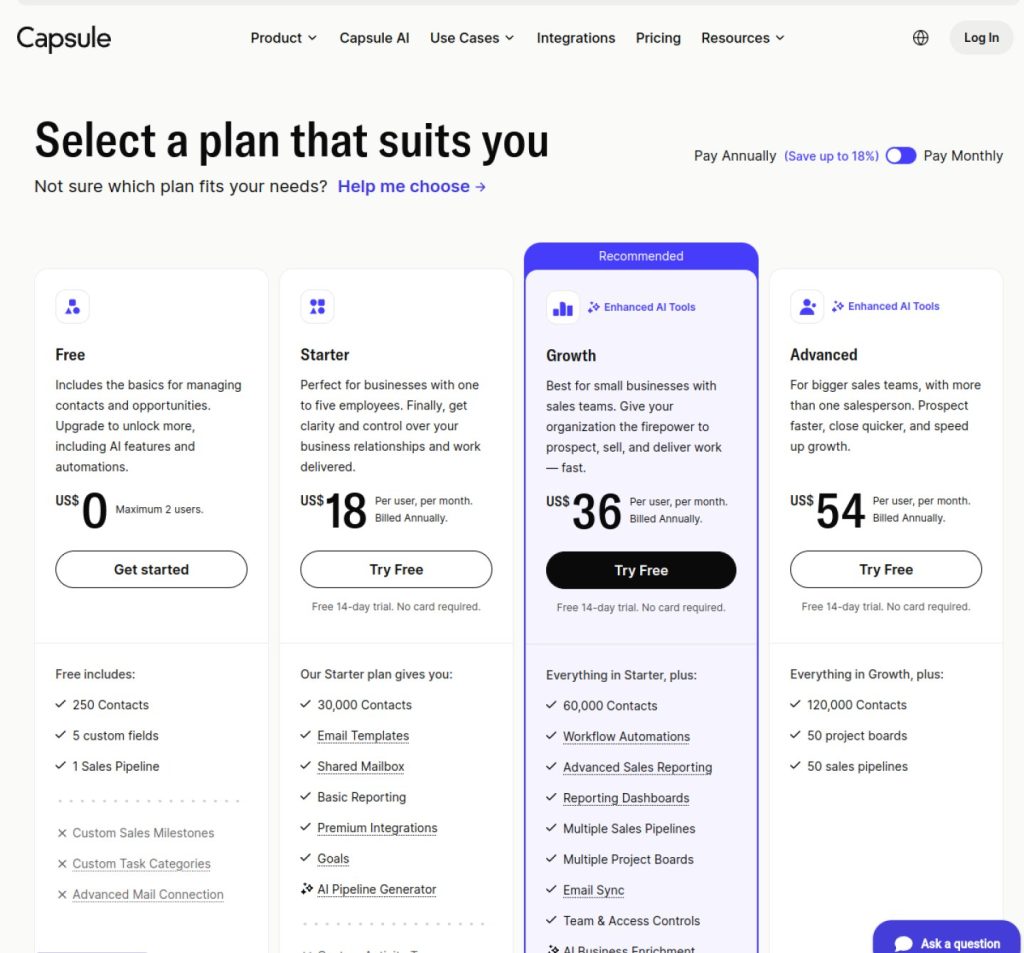
Capsule sits comfortably between the free tools and the pricier specialists. It focuses on clarity: clean contact records, one tidy pipeline, and an interface that takes minutes, not days, to understand. Capsule describes its Starter plan as built for businesses of 1 to 5 people, and it feels exactly like that.
The free plan allows up to 2 users, 250 contacts, 1 sales pipeline, and 5 custom fields. That contact cap is the honest catch. It is plenty for a consultant with a tight client list, and far too small if you collect leads in volume. Starter costs $18 per user per month billed annually. If you later need multiple pipelines or workflow automations, those live on the Growth plan and above, so price that jump before you commit. For the full plan-by-plan detail, see our Capsule CRM review.
What we like
- Calm, clean interface that stays out of the way
- Free plan is enough for a small, settled client list
- Quick to set up and teach yourself
What could be better
- Free plan stops at 250 contacts
- Automations and extra pipelines need Growth or higher
- Fewer integrations than HubSpot or Pipedrive
Folk CRM: best for relationship-led work
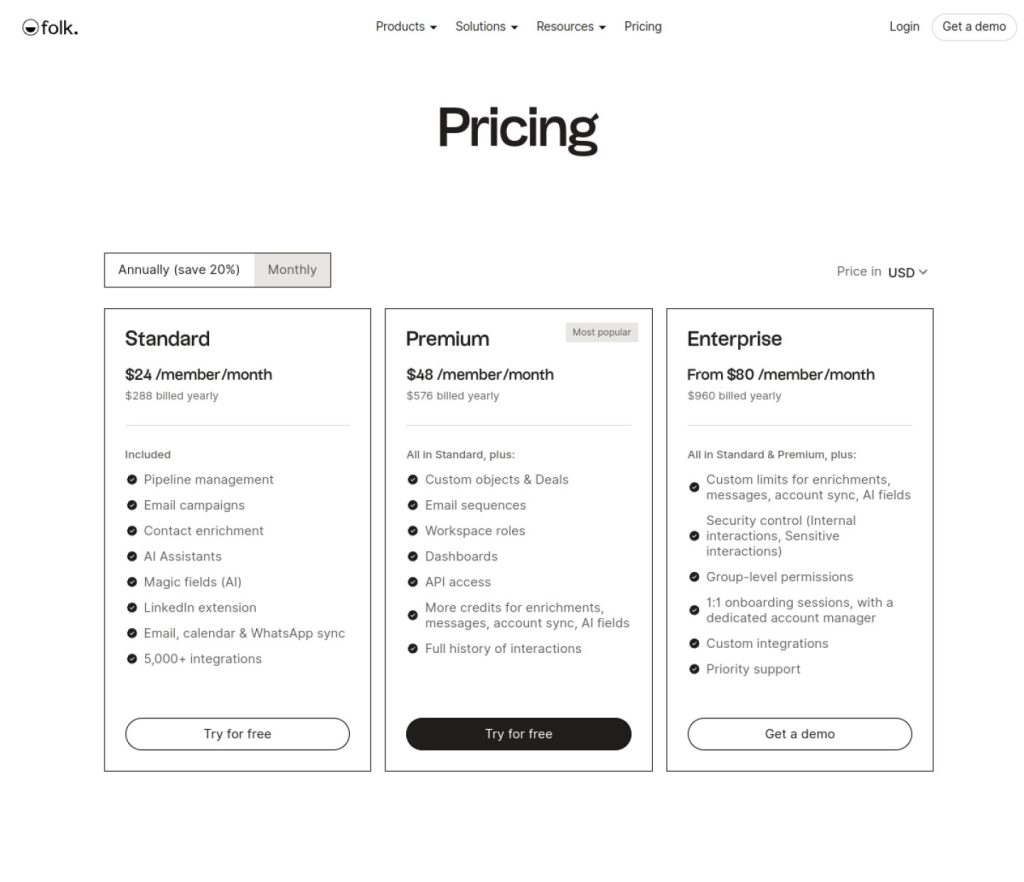
Folk is the newest style of CRM on this list, built for businesses that run on relationships rather than cold pipelines. It pulls email, calendar, LinkedIn, and WhatsApp activity into one timeline for each contact, captures LinkedIn profiles in one click through its Chrome extension, enriches contact details automatically, and offers AI help with drafts and follow-ups. If your next client is usually one introduction away, this design makes real sense.
It is also the most expensive option here, and the least solo-focused. There is no free plan, just a 14-day trial. Standard costs $24 per user per month billed annually, or $30 on monthly billing. Email sequences and advanced roles sit on higher tiers, Folk itself describes its reporting as simpler than enterprise CRMs, and the product is aimed mainly at teams of 5 to 50 people. None of that forbids a solo user, but you should know you are paying for a team tool’s polish.
What we like
- Email, LinkedIn, WhatsApp, and calendar in one contact timeline
- One-click LinkedIn capture and automatic enrichment
- Modern interface that feels built this decade
What could be better
- Highest starting price in this list
- Designed for small teams, not specifically for one person
- Sequences and advanced roles cost extra
What one seat costs for a full year
Monthly prices hide the real commitment, so here is the same shortlist at a full year for one seat, using the annual rates checked above:
| CRM | Plan | One year, one seat |
|---|---|---|
| HubSpot CRM | Free | $0 |
| HubSpot CRM | Starter | $108 (12 x $9) |
| Zoho CRM | Standard | $168 (12 x $14) |
| Pipedrive | Lite | $168 (12 x $14) |
| Less Annoying CRM | Only plan | $180 (12 x $15) |
| Capsule CRM | Starter | $216 (12 x $18) |
| Folk CRM | Standard | $288 (12 x $24) |
Zoho CRM Standard joins the table at $168 a year: its US pricing page confirmed the $14 monthly rate on annual billing when we rechecked in October 2026.
How to choose: the 30-second version
- Budget is zero: HubSpot for ease, Zoho for features.
- You hate admin and setup: Less Annoying CRM.
- You sell all day: Pipedrive.
- Your client list is small and stable: Capsule.
- Your network brings the work: Folk.
One last piece of advice that applies to all six: whichever tool you pick, use it for ninety days before judging it. A CRM only starts paying you back once your real contacts, deals, and follow-ups live inside it, and that habit takes a few weeks to form.
Frequently asked questions
Do solopreneurs really need a CRM?
If follow-ups ever slip through the cracks, yes. The honest threshold is memory: once you have more active leads and clients than you can track in your head without dropping one, a CRM pays for itself. Below that point, a tidy spreadsheet genuinely works, and no tool in this list would tell you otherwise.
What is the best free CRM for a one-person business?
HubSpot CRM if you want the easiest start, Zoho CRM if you want the most features. Both free plans cover a solo user properly, with real pipelines and mobile apps, and neither asks for a credit card.
How much should a solopreneur pay for a CRM?
Based on the tools above, somewhere between $0 and $25 per month covers almost every one-person business. Paying more usually buys team features, extra seats, and admin controls that a solo owner will never open.
When should you upgrade from a free CRM?
When a limit starts costing you work, not before. The usual triggers are needing a second pipeline, wanting follow-up automation, or hitting a contact cap. If none of those has happened yet, the free plan is still the right plan.
Prices and plan details in this article were checked on the vendors’ official websites in October 2026 and can change. For how this site earns money, see our Affiliate Disclosure.
1 comment